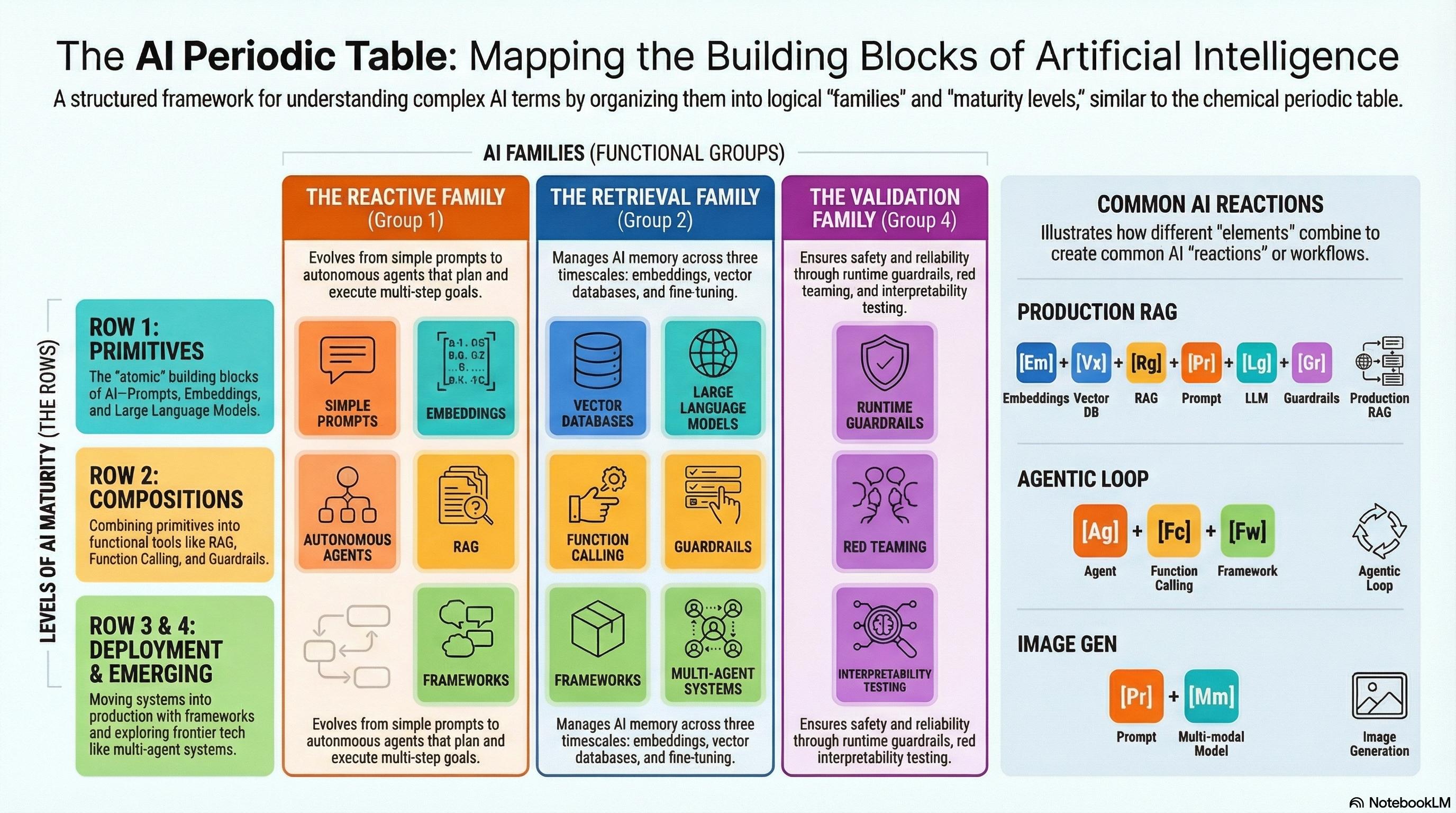
The AI Periodic Table maps the AI ecosystem onto a familiar chemistry metaphor. This idea comes from Martin Keen of IBM—brilliant framing—and the version here expands on that talk, following his suggestion to use the metaphor when planning AI workflows for concrete processing scenarios or use cases. Rows describe how assembled a technology is, from raw atoms to production-ready systems. Columns are functional families: reactive, retrieval, orchestration, validation, or model capabilities. When you treat components as elements, you can see which atoms you have, which molecules you can build, and how those molecules interact in a reaction—a full AI workflow.
| Dimension | Meaning |
|---|
| Rows (levels of complexity) | How “assembled” a technology is—from raw primitives to production systems. |
| Columns (functional families) | The primary role in a workflow (reactive, retrieval, orchestration, validation, or model). |
Below: every element (Pr, Em, Lg, and so on) with a short definition and a real-world example; combo recipes for end-to-end solutions; and practical tips for wiring and validating pieces in your own projects.
Rows – levels of complexity
| Row | What it means | Typical “state” of the element |
|---|
| Row 1 – Primitives | Indivisible building blocks, analogous to chemical atoms. | Ready to be called directly by code; no further decomposition. |
| Row 2 – Compositions | Assemblies of primitives (e.g., prompts, fine-tuned models). | Usually a single artifact (a prompt file, a fine-tuned checkpoint). |
| Row 3 – Deployment | Infrastructure that hosts or runs compositions in production. | Containers, serverless functions, orchestrators, agent loops. |
| Row 4 – Emerging | Cutting-edge ideas that have not yet settled into a stable form. | Multi-agent debate platforms, self-optimising orchestration, generative synthetic-data pipelines. |
Columns – functional families
| Family (column) | Core purpose | Elements (rows 1–4) |
|---|
| G1 – Reactive (action & autonomy) | Produce or trigger actions. | Pr, Fc, Ag, Ma |
| G2 – Retrieval (memory & adaptation) | Store, search, and adapt knowledge. | Em, Vx, Ft, Sy |
| G3 – Orchestration (integration) | Wire primitives and compositions together. | Rg, Fw (no primitives) |
| G4 – Validation (safety & reliability) | Guard, test, and explain AI behavior. | Gr, Rt, In |
| G5 – Models (core capabilities) | Provide the raw intelligence. | Lg, Mm, Sm, Th |
Elements – definitions and examples
G1 – Reactive
| Element | Row | Definition | Concrete example |
|---|
| Pr – Prompting | 1 | Plain text or token string that instructs a model. | “You are a friendly travel assistant. Suggest a 3-day itinerary for Paris.” |
| Fc – Function calling | 2 | LLM-generated structured request that invokes an external API. | An LLM returns { "name": "search_flight", "arguments": {"origin":"NYC","dest":"LON"} }. |
| Ag – Agents | 3 | Autonomous loop (sense → plan → act → observe) that runs continuously. | A meeting-scheduler bot that watches a calendar, proposes slots, calls an API to send invites, and logs outcomes. |
| Ma – Multi-agent systems | 4 | A network of agents that negotiate or debate to reach a collective answer. | A sales platform where pricing, compliance, and UI agents discuss a discount before presenting a final quote. |
G2 – Retrieval
| Element | Row | Definition | Concrete example |
|---|
| Em – Embeddings | 1 | Vector representation of text, image, or audio. | Sentence-Transformer all-mpnet-base-v2 producing 768-dim vectors for each support article. |
| Vx – Vector database | 2 | Store and similarity-search over embeddings. | Pinecone index of 200k product FAQs for fast semantic lookup. |
| Ft – Fine-tuning | 2 | Updating a base model on domain-specific data. | Fine-tuning LLaMA-2-7B on a corpus of 10k internal policy documents. |
| Sy – Synthetic data | 4 | AI-generated training data for another model. | Using a diffusion model to generate labeled medical images to augment a scarce dataset. |
G3 – Orchestration
| Element | Row | Definition | Concrete example |
|---|
| Rg – Retrieval-augmented generation | 2 | Pipeline that retrieves relevant context (via embeddings + vector DB) and feeds it to a model. | A support bot that fetches the top three knowledge-base passages, then asks GPT-4 to craft a response. |
| Fw – Frameworks | 3 | SDKs that describe plumbing for LLM-centric apps. | LangChain chain tying together a prompt, a vector store, a tool-calling step, and a guardrail filter. |
G4 – Validation
| Element | Row | Definition | Concrete example |
|---|
| Gr – Guardrails | 3 | Runtime filters that block unsafe outputs or enforce schemas. | JSON schema validator rejecting any LLM output not matching your contract. |
| Rt – Red-team testing | 3 | Systematic adversarial probing to expose weaknesses. | Running prompt-injection attacks against an internal chatbot and documenting failure modes. |
| In – Interpretability | 3 | Tools that surface why a model made a specific prediction. | Using SHAP to explain feature importance for a tabular classifier in credit-risk scoring. |
G5 – Models
| Element | Row | Definition | Concrete example |
|---|
| Lg – Large language models | 5 | General-purpose, high-parameter LLMs. | OpenAI GPT-4-Turbo, IBM Granite, Claude 3. |
| Mm – Multi-modal models | 5 | Process two or more modalities (text+image, text+audio). | GPT-4-Vision, Meta LLaVA, Google PaLM-E. |
| Sm – Small models | 5 | Lightweight, distilled or quantised models for edge use. | DistilBERT, TinyLlama-1.1B, Phi-3-mini. |
| Th – Thinking models | 5 | Architectures that natively perform chain-of-thought, reasoning, or planning. | CoT-style systems, reasoning-focused GPT variants, or models with explicit reasoning modules. |
Reactions – real-world workflows (combo recipes)
Each pattern below lists a goal, the elements used, a step-by-step flow, and practical tips.
Production RAG (retrieval-augmented generation)
| Goal | Build a safe, data-grounded chatbot for internal knowledge-base queries. |
|---|
| Elements | Em → Vx → Rg → Pr → Lg → Gr |
|---|
| Flow | - Create embeddings (Em) for every knowledge-base article.
- Load them into a vector store (Vx).
- On each question, retrieve the top-k passages (Rg).
- Compose a prompt (Pr) that injects the retrieved snippets.
- Send the prompt to a large language model (Lg).
- Guardrail (Gr) validates the LLM’s structured reply before returning it.
|
|---|
| Tips | Keep vector dimension consistent (e.g., 768). Use hybrid search (vector + BM25) for recall. Guardrails should enforce format (JSON schema) and policy (e.g., no personal data leakage). |
|---|
| When to use | Internal help desks, product documentation assistants, compliance Q&A bots. |
|---|
Agentic loop (autonomous task execution)
| Goal | Automate multi-step business processes (e.g., travel booking) with minimal handoff. |
|---|
| Elements | Ag → Fc → Fw → Lg → Gr (with Pr implicit inside LLM calls) |
|---|
| Flow | - Agent (Ag) listens for a trigger (e.g., a Slack command).
- Agent emits a function-call request (Fc) to an API such as search_flight.
- Framework (Fw) dispatches the API call and returns results.
- Agent asks the LLM (Lg) to rank options and draft an itinerary (prompting is implicit in the call).
- Guardrails (Gr) verify the itinerary against travel policy before email.
|
|---|
| Tips | Persist agent state in a lightweight DB across restarts. Rely on function-calling schemas for deterministic structure. Log decisions for post-mortems and compliance. |
|---|
| When to use | Expense automation, HR onboarding bots, supply-chain order placement. |
|---|
Specialized assistant via fine-tuning + prompting
| Goal | Deliver a domain-specific code assistant that writes production-grade Python. |
|---|
| Elements | Ft → Lg → Pr → Gr |
|---|
| Flow | - Fine-tune (Ft) a base LLM on internal code, tests, and style guides.
- Deploy the fine-tuned model as your Lg.
- At inference, prepend a prompt (Pr) with API surface and constraints (e.g., PEP 8).
- Guardrail (Gr) runs static analysis (e.g., pylint) and rejects policy violations.
|
|---|
| Tips | Balance the fine-tuning dataset (good vs. buggy code). Add few-shot prompting for rare edge cases. Cache guardrail results for identical prompts when latency matters. |
|---|
| When to use | Internal SDK generation, API client scaffolding, domain-specific documentation bots. |
|---|
Synthetic-data-powered vision system (emerging)
| Goal | Train a small vision model for defect detection when real images are scarce. |
|---|
| Elements | Sy → Mm → Ft → Gr |
|---|
| Flow | - Use a diffusion model (Sy) conditioned on CAD drawings to synthesize defect-annotated images.
- Train a multi-modal model (Mm) (e.g., CLIP-based) on the synthetic set.
- Fine-tune (Ft) on a small set of real photos to close the domain gap.
- Deploy with guardrail (Gr) that routes low-confidence predictions to human review.
|
|---|
| Tips | Validate synthetic diversity (e.g., embedding visualisations). Use domain randomisation (lighting, texture) for robustness. |
|---|
| When to use | Manufacturing QA, regulated medical imaging, satellite anomaly detection. |
|---|
Designing your own reaction
- Identify the goal – What output or action must the system produce?
- Pick a core model (G5) – Large, multi-modal, small, or thinking, depending on latency and budget.
- Add retrieval (G2) if knowledge grounding is required.
- Use orchestration (G3) to manage data flow.
- Choose a reactive element (G1) for the final act—prompt, function call, or agent.
- Layer validation (G4) – Guardrails first, red-team later, interpretability as needed.
- Iterate – Swap primitives for fine-tuned versions or emerging synthetic-data pipelines as you mature.
Quick checklist (copy into your notes):
- [ ] Goal statement
- [ ] Core model (Lg / Mm / Sm / Th)
- [ ] Retrieval needed? → Em + Vx
- [ ] Fine-tune? → Ft
- [ ] Reactive style? → Pr / Fc / Ag / Ma
- [ ] Orchestration? → Rg / Fw
- [ ] Guardrails? → Gr (schema, policy)
- [ ] Red-team tests? → Rt
- [ ] Explainability? → In
- [ ] Emerging boost? → Sy / Ma
Conclusion
The AI Periodic Table is more than a catalog of tools—it is a design language. Treating each piece as an element helps you diagnose gaps (“we have retrieval but no guardrails”), align engineering with product and compliance, and compose reusable molecules (a RAG block) into larger compounds (agents, multi-agent platforms).